Event Details
OPC Interoperability Workshop, Europe
Date:
Location:
Siemens AG, Nürnberg
Nürnberg
Bavaria
90475
Germany
Map and Directions
If you have already registered to attend this event and have not yet specified your products in the OPC Interoperability Test Application, please do so now.
Overview
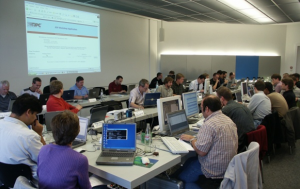
This workshop is “the” event for testing OPC products for interoperability and preparing them for market. Vendors can test and debug their products against one another for interoperability, compliance and reliability. IOP workshops also provide an ideal opportunity to network with your peers, learn about OPC technology and interact with industry-leading experts.
Plan on debugging issues that occur and be prepared to modify your software components if required. Testing will be primarily for the successful operation between clients and servers; we will test for failures as time permits.
The OPC Interoperability Workshops are open to OPC Foundation member companies only at a cost of €350 (US $455) per person. Space is limited to 40 attendees, so register now!
The 2013 IOPs were very successful, with several members reporting that it was “extremely valuable” in preparing their products for release.
Training
Two optional training sessions (15 – 30 minutes) will introduce and promote various OPC activities and deliverables:
- Discovery: New discovery mechanisms will be tested at this event. We will explain Subnet-Discovery and Global Discovery Services (GDS).
- Certificate Management: Learn quickly how to setup and manage a secure infrastructure using OPC UA certificates.
Challenge “Stress” Test
This workshop will also feature the Challenge Test, in which multiple OPC clients and servers will be stress tested with thousands of tags/nodes per connection, concurrently during network connectivity losses.
Products that successfully pass the Challenge Test are ideal candidates for OPC Foundation lab certification.
Available OPC Technology For Testing
- OPC Unified Architecture (UA) – Windows, Linux, Embedded
- OPC Classic (COM-based)
- OPC Classic (.NET 3.0/4.0 WCF)
Provided Infrastructure For Testing
- Local Area Network consisting of a standard CAT5 Ethernet cable
- Internet access
- Microsoft Windows Server Domain Controller (for testing OPC Classic products)
- Web-based application providing Test suggestions and for recording test results
What to Bring
- Computer (laptops are preferred) containing your OPC product(s) for testing.
- Backup drives and/or restoration DVDs in the event your PC crashes.
- Any additional hardware/software needed to conduct your testing.
NOTE: If you plan on testing COM-based products, your PC will need to enter our Domain, so please make sure you have administrator access to be able to do this. We recommend that you DO NOT bring laptops that are configured for your corporate domain.
Primary Contact
If you have questions about the OPC Interoperability Workshop, please contact:
Karl-Heinz Deiretsbacher, Siemens AG
karl.deiretsbacher@siemens.com
Phone: +49-911-895-2129
Fax: +49-911-895-152129
Agenda
Interoperability Workshop Preparations
Attendees will be asked to specify their products in the OPC Interoperability Test Application in order to have more time for testing during the workshop. Instructions will be provided in the event payment confirmation email.
Monday, 17 November
13:00 – 17:30
- Network and Computer Setup
- DCOM Configuration
- Verify Connectivity
- Begin General Testing
We will start with network configuration, followed by DCOM configuration. This will be done step-by-step with on-screen instructions. After successful configuration all PCs will be part of the domain. A “share” partition on the domain server will be used to exchange files, if necessary.
Introduction to the infrastructure and the test procedure:
- All Servers have to be specified by means of a web-based entry form (ProgID, general properties, supported optional interfaces, supported ItemIDs/Conditions, etc.). This test data will be available for the clients.
- Clients will also use web-based entry forms to find available servers, view their properties, select them for testing, fill in test results, etc..
Tuesday, 18 November – Thursday, 20 November
08:30 – 17:30
- General Testing
These three and a half days will be available for general testing. Every client has to perform an IOP test with every server of different vendors. Web-based forms will show the status with respect to available servers and clients.
From past experience, we estimate an average of one hour for each test combination.
Each client vendor must enter the test results for each tested server into a web-based database. The database will be available to all participants at the end of the workshop.
Friday, 21 November
08:30 – 12:00
- General Testing
Location
Description:
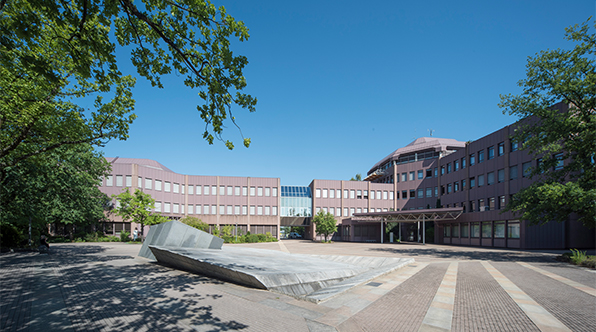
Directions to Siemens
By Car
From: München / Berlin
Take motorway A9 towards Nürnberg until motorway intersection Nürnberg-Ost (do not drive towards Heilbronn at the exit Feucht already!);
Now take motorway A6 towards Heilbronn;
Exit the motorway at “Langwasser”, heading for Innenstadt/Messe;
SIEMENS is the first building on the right hand side (approx. 600 meters from the motorway exit);
Please, use the visitor parking area and entrance (second drive).
From: Karlsruhe / Stuttgart / Heilbronn / Amberg
Take motorway A6 towards Heilbronn;
Exit the motorway at “Langwasser”, heading for Innenstadt/Messe;
SIEMENS is the first building on the right hand side (approx. 600 meters from the motorway exit);
Please, use the visitor parking area and entrance (second drive).
From: Würzburg / Frankfurt
Take motorway A3 towards Nürnberg / München until motorway intersection Nürnberg;
Now take motorway A9 towards München until motorway intersection Nürnberg-Ost;
Take motorway A6 towards Heilbronn;
Exit the motorway at “Langwasser”, heading for Innenstadt/Messe;
SIEMENS is the first building on the right hand side (approx. 600 meters from the motorway exit);
Please, use the visitor parking area and entrance (second drive).
By plane or train
From the Airport by public Transportation
Take airport bus no. 20 to Nürnberg-Herrnhütte;
Change to subway no. 2 towards Nürnberg main station;
Exit at Nürnberg main station and change to subway no. 1 towards Langwasser;
Exit at Langwasser-Mitte and take bus no. 57 towards Fischbach;
Exit at Moorenbrunn-Feld, SIEMENS is right across the street.
From the Main Station by public Transportation
Exit at Nürnberg main station;
Take subway no. 1 towards Langwasser;
Exit at Langwasser-Mitte and take bus no. 57 towards Fischbach;
Exit at Moorenbrunn-Feld, SIEMENS is right across the street.
From the Airport or Main Station by Taxi
The taxi stand is right in front of the exit from the airport or main station. The length of the trip and its costs applies to normal traffic circumstances.
From the airport to SIEMENS Moorenbrunn
Length of time: about 25-30 min.
Price: about €45
From the main station to SIEMENS Moorenbrunn
Length of time: about 15-20 min.
Price: about €30
Siemens AG
Nürnberg
Bavaria
90475
Germany
Venue Website: http://www.siemens.com/entry/cc/en/#/startscreen
Hotels
Attendees are responsible for making their own travel and hotel reservations.
Following is a list of hotels in the vicinity:
- Arvena Park Hotel: Nürnberg-Langwasser, 2 km
- Country inn Gentner: Moorenbrunn, 1 km
- Ramada Treff: Altenfurt, 1 km
- Daucher: Altenfurt, 2 km
- Silberhorn: Fischbach, 3 km
Additional popular hotels include:
Inter City Hotel (City Center)
Eilgutstr. 8, Nürnberg
Phone: +49-911 / 24 78 0
Fax: 24 78-99 9
Maritim Hotel (City Center)
Frauentorgraben 11, Nürnberg
Phone: +49-911 / 23 63 0
Fax: 2363836
Carlton (City Center)
Eilgutstr. 13-15, Nürnberg
Phone: +49-911 / 20 03 0
Fax: 2003532